Thursday, August 18, 2011

9 Free Books to Download

Here's a great opportunity to download up to 9 books for free. This is a back to school special offered on the Writer's Digest Site. Each book is available in  the following formats: Kindle download, Nook download, Google download and iTunes download. The offer expires on August 22, 2011, so share with your colleagues and friends.

Thanks to Joyce Valenza for posting on Twitter!

When Your School Library Budget is Slashed

Money has really been tight for education lately. Every year, my budget gets cut a bit more than the last year. In New Jersey, our "beloved" governor took millions away and the pain of cuts has continued into the 2011-2012 school year. I have around 70% less than last year, and now my game plan has changed. Are you in the same situation? I bet you are. I have decided to share with you some of the things I'm doing this year to provide free resources to replace those we lost.

1. Alternatives to Facts on File- The databases included in our school package are terrific, but the cost of $800+ is something we can't afford. The Facts on File databases we had were: World Geography and Culture Online, American History Online, Modern World History Online, American Women's History Online, African American History Online, American Indian History Online, Ancient and Medieval History Online, Science Online, Fergusen's Career Guidance Center, Bloom's Literary Reference Online and the Curriculum Resource Center. Here's what free online resources I'll be recommending which our students and staff could use. Many are pathfinders I have created with sites I have already cleared for student use. They include:

African-American History- African-American Scientist and Inventors Pathfinder, Apartheid PathfinderBlack History Month Pathfinder, Civil Rights Pathfinder, The Harlem Renaissance Pathfinder, Martin Luther King, Jr. Pathfinder, Slavery Pathfinder

Career Resources Pathfinder

Medieval Times Pathfinder

Women in History Pathfinder

Several databases from EBSCO, which are provided for free for us from the NJ State Library:  Student Research Center, Literary Reference Center, Points of View, History Reference Center, Science Reference Center, Business Source Premier, Funk and Wagnalls New World Encyclopedia and Novelist Plus. If your school doesn't have direct access to EBSCO, try your public library and maybe students can enter through their site by using individual library card numbers.

2. Alternatives to magazine and newspaper subscriptions- We used to subscribe to about 24 magazines, and I will be forced to weed out about half. BUT.....I was very happy to find that many of them including Consumer Reports, (full text 1991-present) TIME, (full text 1990-present) American History (full text 1994-present) plus many more are available through EBSCO.  Many magazines have web sites, (another choice) but you can't always find full text articles there. Digital subscriptions cost money. Now, all this online viewing brings up another problem: without any computers available, how do students read online? I wonder how schools with iPads are utilizing them. If you are one of those schools, I'd love to hear from you.

Our school is fortunate to receive free access to the digital editions of The New York Times and our local county paper, The Record. Unlike the web sites, this digital edition is like reading the actual newspaper, page by page. I just applied for USA Today Classroom Newspaper Grants. Check and see what local newspapers have to offer your school.

3. Amazon School Rewards- For the past two years, we have been using Amazon School Rewards to raise money without asking people to open their wallets. Simply by entering the site through our link, we receive advertising fees based on what items are purchased. I chose for us to receive that money in the form of gift cards, which I then purchased books with by entering the site through our link. The more people you get on board, the more money you will make.

4. Raffle- Last year our library raffled off an iPod Touch and made a profit close to $200.00. This year's item will either be an iPad or an XBox 360, depending on the results of a poll we are taking. It may seem like small change, but the hundreds add up.

What YOU doing to stretch your dollars? Please comment below.

Wednesday, August 17, 2011

Edutopia: George Lucas' Foundation is a Super Resource For Teachers

I love Edutopia. Whether you are a beginning teacher or experienced, Edutopia has so much to offer, from technology integration tips to classroom management advice. Several times per year you can download a guide. (Past manuals have included Back to School, Home to School Connections Guide, Think Green Guide) The newest one is Ten Tips For Classroom Management.

Edutopia offers a long list of blogs, forums for discussion, videos and the ability to browse by your grade level. Take advantage of this wonderful resource by bookmarking it and returning often.

Monday, August 15, 2011

New Guide: The Newbie's Intermediate Web 2.0 Guide

I've just posted a new guide for Web 2.0. You can access it by clicking under the free guides (right column) or here. This is a followup to "The Web 2.0 Newbie Starter Kit".

Friday, August 12, 2011

Infographics, Part II: How to Create an Infographic- 44 Places to Find Tutorials and Tools


Yesterday I posted a listing of infographics by subject area.  If you are interested in creating your own infographic for a lesson, today's posting provides sites to learn how to create an infographic and a long list of tools which will help you with your project. 

 HOW TO CREATE AN INFOGRAPHIC
5 Unbeatable Types of Infographic and Free Tools to Create Them- Search Engine Journal has provided very useful information


10 Awesome Free Tools to Make Infographics- from Makeuseof.com; list of tutorials and program

19 Word Cloud Resources, Tips, and Tools- from Shelly Terrell's Teacher Reboot Camp


DIY Infographic Production- instructions in the form of what else, an infographic

Make Your Own Infographic- from Wild Apricot Blog

Tutorials on Making Interactive Infographics- 2 videos


FREE TOOLS TO MAKE AN INFOGRAPHIC
AmCharts- flash and java script charts

Barchart- simple tool to use


Bubbl.us- create colorful mind maps

Cacoo- create diagrams online

ChartGizmo- online chart builder

ChartGo- input your information and create your chart

ChartPart- chart generator

Chartle- simple and interactive charts

Crappy Graphs!- very easy way to make graphs

Create a Graph- from Kids' Zone; easy to use

Creately- make diagrams and flow charts

Diagrammr- create and share diagrams by writing sentences

Free Vector World Maps Collection- high resolution world map images

Gapminder Desktop- show global trends with this downloadable program; very nice!

Gliffy- online diagram and flowchart software

Google Chart Toolsgallery of interactive charts and data tools.

Google Public Data- use public data and turn it into an infographic

Gunn Map-paste in your data and create your custom world map

Hohi- online charts builder

Inkscape- Open Source vector graphic software

Lucid Chart- online diagram and flow chart

Make Sweet- create Venn diagrams

Many Eyes-create your visualization by uploading information

Mind 42- mind mapping

Pie Color- make a pie chart in 2D or 3D

Pretty Graph

SlickPlan- create sitemaps and flowcharts

Statplanet- "browser-based interactive data visualization and mapping application."

Tableau- create visualizations; download required; only Windows available


Wordle- create word clouds

Have You Used Infographics in Your Classroom?


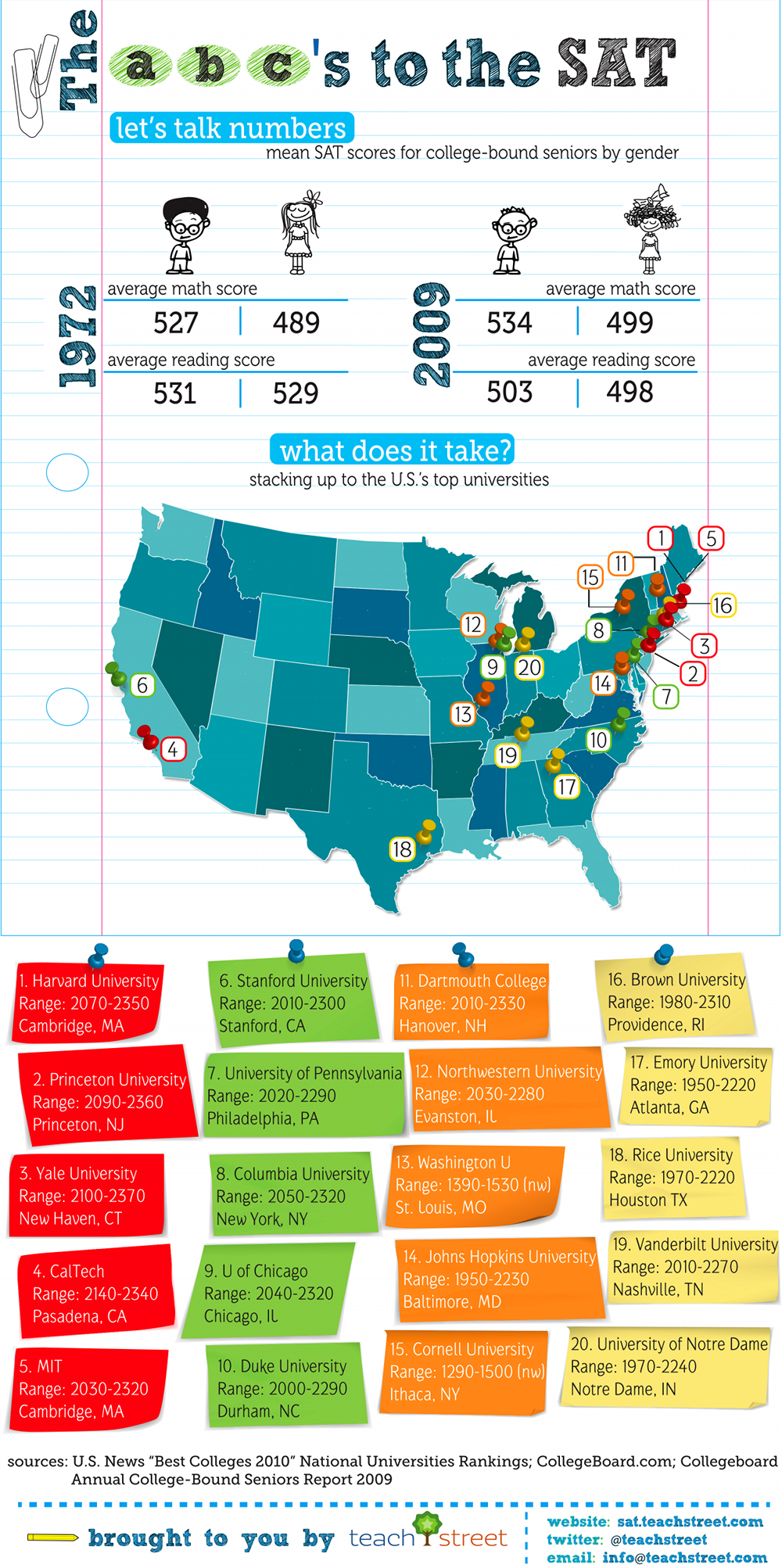
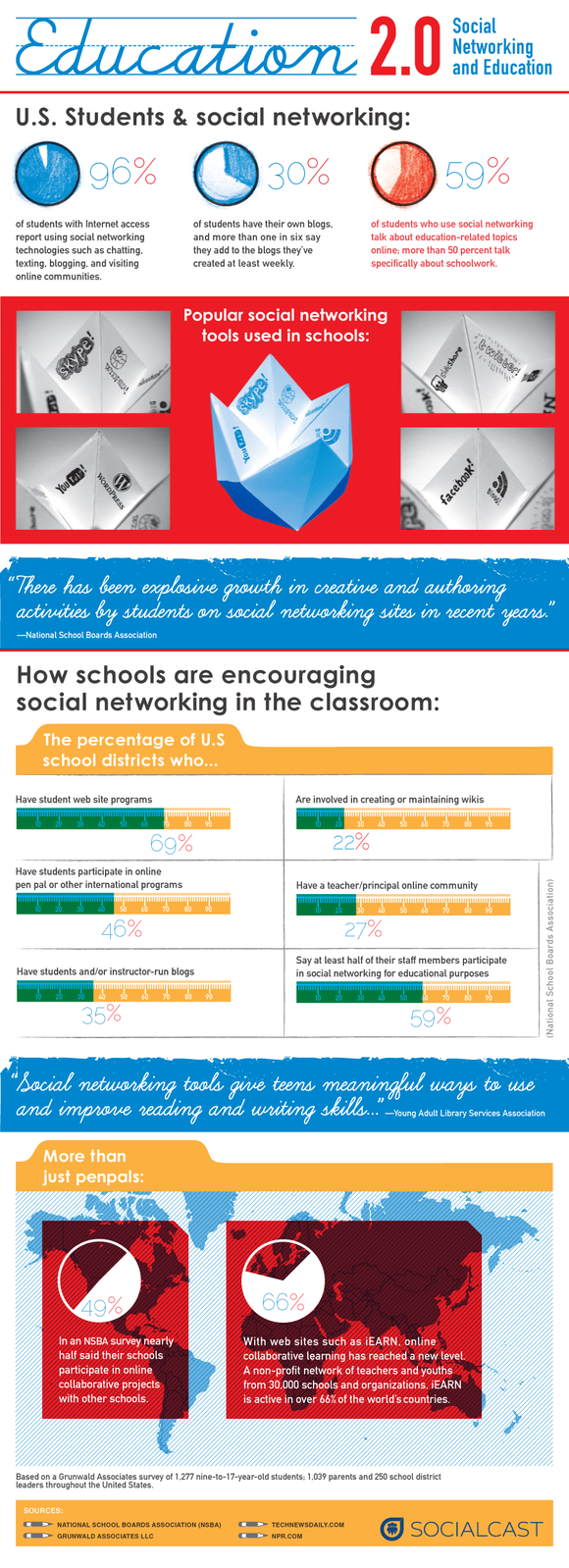
We live in a visual world. Our students spend hours every day on their cell phones, computers and computer games. So what better way to teach a particular subject then by using an infographic. If you've never heard of this wonderful teaching tool, let me explain; infographics are a visual representation of information, facts or knowledge. If you've ever ridden the subway, I'm sure you noticed the subway map which displayed all the different trains and their routes. (color-coded) That poster is an infographic. Take a look at some of the 118 resources below and you'll see what a great addition to a lesson plan an infographic can make.


EDUCATION
1 Dropout Every 26 Seconds!

10 Jaw-Dropping Awesome Infographics on Education


Digital Resume- Michael Anderson's resume as an infographic is outstanding!

Teaching With Infographics: Places to Start- from the New York Times; examples shared over five days. Includes a section on the page entitled "Places to Start Learning About Infographics."

HEALTH
17 Educational Infographics to Learn About Reproductive Health-includes Teen Pregnancy in America, Abortion State-By-State, STDs in America and Porn and the Economy.

The Addiction Process: How We Get Addicted

Amazing Facts About the Human Body


CDC- Data and Statistics on Obesity

How Healthy is Your City, State or Country?- topics covered include obesity, environmental issues, diseases and addictions and other issues.
How Soft Drinks Impact Your Health

Lung Cancer Facts


Flowing Data-collection includes the Kennedy family tree, Evolution of the Two-Party Vote During the Past Century and What Generation Do You Belong To?

Haiti Earthquake Infographics- this was a contest held in Feb. 2010; thirteen entries can be viewed

Help Japan- March 11, 2011 earthquake

History Shots-political, sports, military, adventure and general categories

Infographics News- news infographic

Information Aesthetics-political, financial and economic topics

Simple Complexity- samples include Misleading Statistics, Berlin Wall, and Government Expenses Worldwide by GDP.

What Does Your State Do Worst?- from crime to pollution each state is labeled in this infographic

Where in the World Are Exiled Leaders?


Wall Stats- political and economic topics

Bloody Mess- blood spatter

Famous Crimes (forensics)

Waste in Space- "space junk" up there

Tuesday, August 9, 2011

New to Our Profession? Here Are 30 Links to Resources Which Help You in Your Job

If you're reading this post for information, congratulations! In a time where so many teachers have lost their jobs, you are very fortunate to have been hired for the 2011-2012 school year! Help is right around the corner. (or should I say paragraph?) The best advice I can give you is to find a mentor (someone who has been teaching at least 4 years or more) and use that person's knowledge and experience to assist you. Take it one day at a time and be prepared to work. Here's a great quote a colleague of mine posted recently: "The mediocre teacher tells. The good teacher explains. The superior teacher demonstrates. The great teacher inspires."-William Arthur Ward.  (Thanks, Brenda!)  Best of luck and go inspire your students!


6 Quick Tips For New Teachers- told like a fairy tale, this cute video is very helpful!


50 Best Blogs for Brand New Teachers

100 Mistakes New Teachers Make

101 Things for the First Three Weeks


How Teachers Can Use Educational Technology Successfully

Icebreaker Activities- from A to Z Teacher Stuff; elementary kids; some older

Louise Maine on Wikis- not sure what a wiki is, click here for a definition


Most Important Skills for a New Teacher- post by K. Jarrett, who is a K-4 technology teacher

New Middle Grade Teachers

NewTeacher- site was founded by former teachers Rosemary and Harry Wong; many links to articles and web-based papers

New Teacher Center- news and many resource links

New Teacher Resource Center- created by ESL teacher Dorit Sasson, the site has many tips and booklets for download.


New Teacher Survival Central- from blogs to basics to classroom tools; Discovery Education

New Teacher Tech Survival List- from the Nerdy Teacher's blog

Newbies- from TeachersFirst.com

 
Preparing for the First Day-includes a survival kit, ideas; from Education World

Survival Guide for New Teachers- from Scholastic.com; includes tips, printables, helpline and survival guide.

Teachers' Network- covers Back to School Night, opening activities and parent-teacher conferences.

Teachervision's New Teacher Resources- comprehensive list includes, Slideshows of Advice, Beginning of the School Year, The Classroom, Dealing with Homework, Teacher-Parent Relationships, Classroom Notes, Passes, Forms and much more.

Technology Integration For Beginning Teachers

Top 10 Technology Tips For New Teachers

LinkWithin

Related Posts Plugin for WordPress, Blogger...

AddToAny