NOTE: When I began working on this post, I hadn't attended the NJASL (
NJ Association of School Librarians) Conference. Saturday I had the pleasure of meeting Emily Grover and Brad Heringer, who both work for EasyBib. Their presentation pushed me to finish this post on EasyBib and what it has to offer.
Many of you have heard of
EasyBib, one of many free online citation generators. You and your students will find much more free stuff here. When you enter the home page, you will see many tabs to choose from. Below these tabs is the Citation Generator, where your students can pick from over 59 different sources to cite.
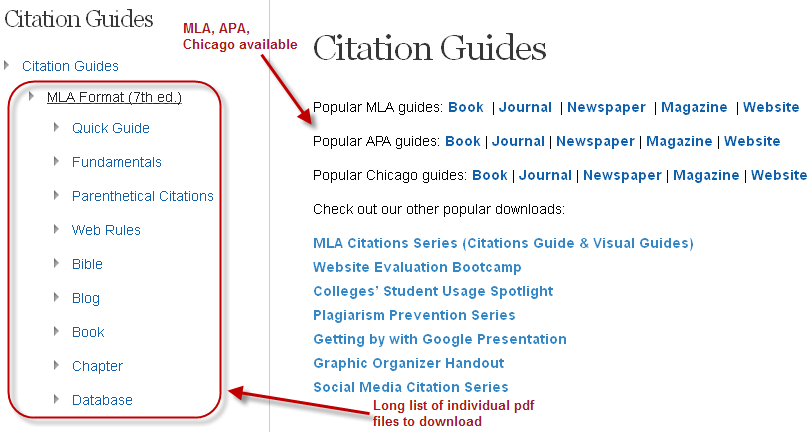
Let's first explore the one you are familiar with; the citation tab. under this section, there is a long list of downloadable pdf files in three different formats: MLA, ALA and Chicago/Turabian. Let's look at MLA, since that's what our high school students will be using. Roll your mouse over Citation Guides and MLA and you will see a long list of guides to choose from. All the guides are visually pleasing and easy to follow, so students won't have a problem understanding them.
Below on the left side of the page there is a list of Info Lit resources, which include, Website Evaluation Bootcamp, Plagiarism Prevention Series, Getting by with Google Presentation, and a Graphic Organizer handout. You can easily subscribe to any of the EasyBib series or their newsletter by filling in your name and email.
Now let's click on the research tab (
on the HOME page) and search the term "school uniforms".
When students search on the EasyBib site, they are given results which rate the source as either credible, not credible or no rating. As you will notice in the image below, sources can be sorted in different ways. It is very easy to cite each and every one on the list just by clicking "Cite it".
Educators have a myriad of resources at their disposal on this site. From the home page, click "
Educator Blog" which will lead you to a blog page with several choices, including Educator Resources, Product Resources, Professional Development and Student Resources. Let's first look at the Educator Resources.
There is a long list of handouts, including lesson plans, flyers, and the EasyBib Community. (social media sites under EasyBib) The Professional Development tab takes teachers to a listing of webinars, and the Student Resources offer research, citation, writing and topic guides, which can either be read online or saved as pdf files.
The only concern I have is with the left column roll-over categories. When you mouse-over a topic and it opens to a longer list, it moves too quickly and makes it difficult to pick what you would like to click on. I'm sure that it something that the site's webmaster can easily fix. In the meantime, I'm directing my students to EasyBib so that they can be information literate. For me, it's a no-brainer!